TL;DR: What Your Velocity Chart Cannot Tell the CFO
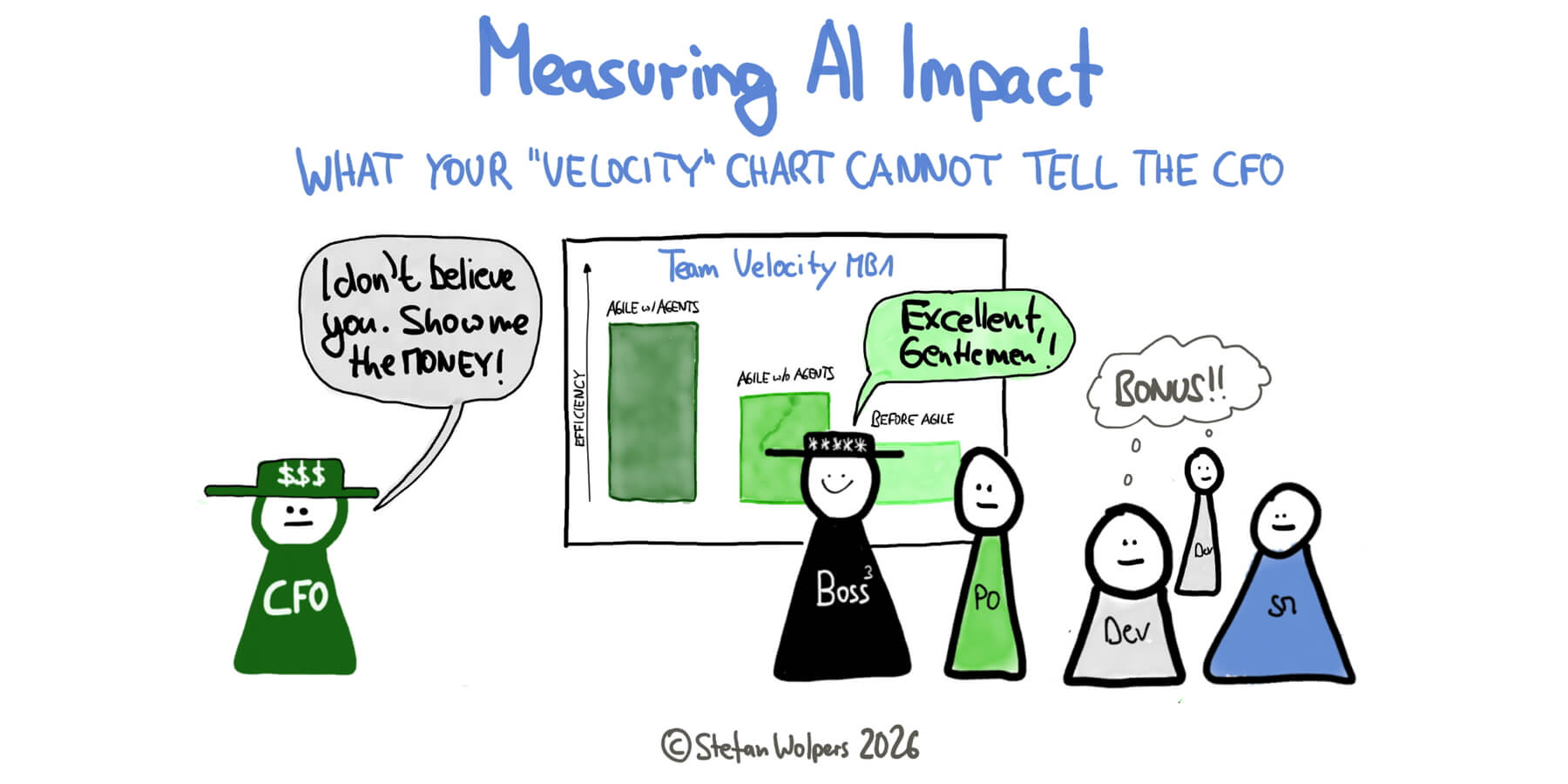
Sooner or later, someone in your organization shows a slide with a number about what AI did for your team: typically, the team’s “velocity” before and after the coding agents arrived, plus a percentage that looks like a return on the token bill. The number may even be “correct”; however, it answers a different question than the one finance is asking: A before-and-after comparison credits every change in that period to the agents, and measuring velocity is controversial for good reason under normal circumstances, which makes measuring AI impact by this means even more challenging.
A claim your team can defend starts elsewhere: with an honest grade of the evidence, a break-even test for every delegated AI workflow, and the creep check of the AI Delegation Audit, which catches the workflows that pass the test only because nobody reviews their output anymore. Each workflow then gets a keep, change, or retire decision in the Re-classification Log, and the result fits on one page that states what the team can claim and what it cannot. Bonus: For your own work, a small trial of eight to ten runs gives you a direction you can act on.
Thesis: This article explains how agile teams can measure AI impact effectively, why before-and-after velocity charts mislead, the three grades of evidence, a break-even test for delegated workflows, a one-page statement for finance, and a personal trial.
Disclaimer: I read Charniak/McDermott’s book on “Artificial Intelligence” decades ago; of course, I use AI for research, translations, proofreading, challenging story arcs and article structures, creating artifacts such as graphics, and summarization. It is a production tool, not a substitute for thinking.
🎓 🇬🇧 The AI4Agile Online Course v4 — November 27, 2026, at $149 — Join the Waitlist
Sooner or later, a CFO will ask what your AI use actually returns. “It saves me time” will not survive that meeting.
The first wave of AI adoption rewarded practitioners who learned to prompt. That skill still matters, and this course still teaches it. The second wave rewards something rarer: people who can turn individual AI use into knowledge that survives departures, spend that can be explained and steered, and output that organizations can trust. That work is process design and change management. You have been doing both for years, on harder problems than this.
EXCLUSIVE: The new A3 Delegation Lifecycle System with seven ready-to-use templates, from the AI Workflow Inventory to the AI Definition of Done to the AI Working Agreement, to make sense of delegating work to AI models.
BRAND-NEW: Hands-on exercises to build AI Agents, with your tactical work, covering, for example, Jira-based stakeholder reports, product discovery, AI Impact on metrics, or preparation for backlog refinement. All exercises use realistic data and context to simulate reality as closely as possible in a fail-safe environment.
The AI 4 Agile Online Course v4 is in English. 🇬🇧
What You Will Get:
✅ 20+ hours of self-paced video modules ✅ 4 Live onboarding session ✅ A cohort-hardened, proven course design ✅ Learn to 10x your effectiveness with AI; your stakeholder will be grateful ✅ Apply AI to classic use cases of “Agile” ✅ The A3 Delegation System comprising seven ready-to-use templates ✅ All texts, slides, prompts, and graphics ✅ Access custom GPTs, including the “Scrum Anti-Patterns Guide GTP” ✅ Guaranteed: Lifetime access to v4 ✅ AI4Agile Foundation Certificate: 40 questions in 45 minutes.

👉 Please note: The course will be available for $149 from November 27-30, 2026! (After that, $249.) 👈
🎓 Join the Waitlist now and be the first to know: The AI4Agile Online Course v4 — November 27, 2026, at $149 — No Coding Required!
🇩🇪 Zur deutschsprachigen Version des Artikels: Messung der KI-Wirksamkeit: Was Ihr Velocity-Chart dem CFO nicht sagen kann.
🗞 Shall I notify you about articles like this one? Awesome! You can sign up here for the ‘Food for Agile Thought’ newsletter and join 35,000-plus subscribers.
🎓 Join Stefan in one of his upcoming training classes!
The CFO’s Question Is Legitimate
Let me guess: The number arrived before the question did. At an all-hands, a stakeholder steering committee, or a quarterly business review, one slide showed the team’s velocity in the months before the AI rollout next to the months after, with a green arrow and a percentage, and nobody in the room asked what else had happened in those months. The percentage then traveled upward into the next board deck.
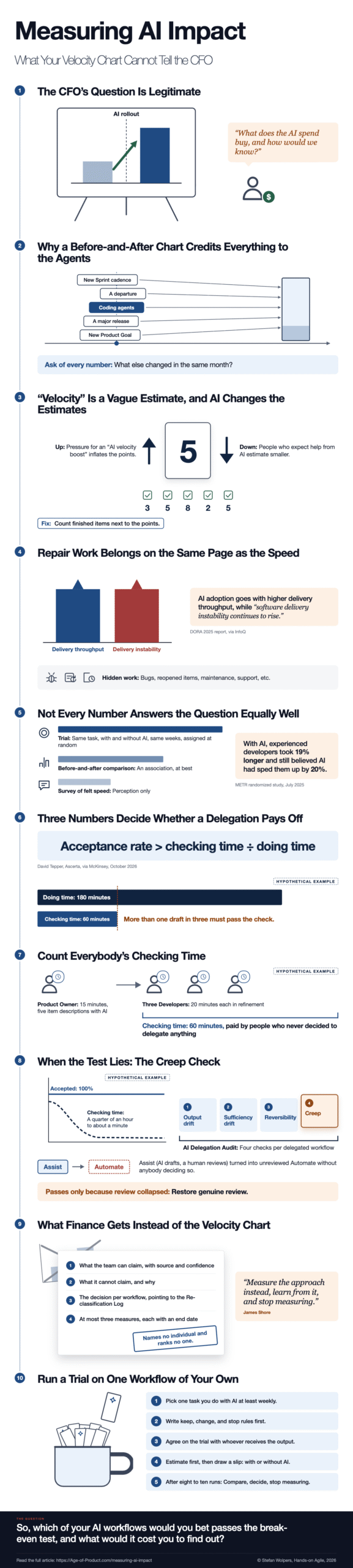
A few weeks later, finance asks the question the slide seemed to answer: What does the AI spend buy, and how would we know? It is a fair question, given that many managers still treat “velocity” as a useful measure of team productivity, even of advancement, despite the controversy surrounding it. The velocity chart looks like the obvious answer to the CFO’s inquiry, yet it cannot carry the weight finance puts on it.
Why a Before-and-After Chart Credits Everything to the Agents
Teams rarely change one thing at a time. The coding agents arrive in the same quarter as a new Sprint cadence, a departure, a reorganization, a major release, or a new Product Goal or product roadmap objective. Comparing “before” with “after” puts it all on the agents’ account. The “before” may not be a calm baseline, either: If the rollout followed a crunch, or if people had used AI privately long before the official licenses arrived, the comparison measures the crunch and the private use as well.
James Shore, who published a series of articles on measuring AI’s impact in September 2026, names the problem in Measuring AI’s Impact on Delivery Speed: “Are your speed increases due to introducing AI? Or the other changes you made at the same time?” His remedy is to “interleave ‘without AI’ tasks and ‘with AI’ tasks” in the same period, which “reduces the influence of other changes.” That is a study design, and a study design needs a decision before the work starts, which is why a chart assembled after the fact cannot stand in for it. So the question to ask of every before-and-after number is simple: What else changed in the same month?
Cannot see the form? Please click here.
Velocity Is a Vague Estimate, and AI Changes the Estimates
Story points are the Developers’ estimate of an item, made in refinement or Sprint Planning before anybody builds it, and their value lies in the conversation that shows whether everybody on the team is on the same page, as I argued in Estimates Are Useful, Just Ditch the Numbers; the number was never the point. “Velocity”, the sum of those numbers per Sprint, therefore rises when the team finishes more or when it estimates comparable work higher, and a velocity chart cannot tell the two apart. Shore is blunter about it: “Stories? Velocity? Story points? Completely arbitrary.” (It is one of my favorite exercises in one of my Scrum classes; I call it “Cooking the Agile Books.” The rules are simple: inflate your story point count per Sprint without working more to satisfy your demanding manager. Guess what? Everyone knows how to play the game, which shouldn’t surprise anyone, given Goodhart’s law.)
Part of the reason is that every estimate is deeply embedded in the context of the team that made it: who is on the team, whether the item touches a part of the application the team knows well or a brand-new one, whether the team’s composition has changed since it last estimated something similar, which tools it uses, what its morale is like, and how unexpected events have affected individual team members. That is why you can’t compare velocity between teams, and with so many variables influencing both estimates and performance, using estimates as a measure of anything is tricky at best, and, most of the time, useless.
An AI rollout changes several of those variables at once, and it can push the estimates in either direction. Shore describes the downward push: “if they think they’re going to use AI, and they think AI makes them faster, their estimates will be smaller,” so smaller numbers may hide a real gain. The upward push is the familiar estimate inflation: once management expects an “AI velocity boost,” a team under pressure may find that comparable work suddenly deserves more points; see my exercise above. Either way, the velocity before the rollout and the velocity after it are no longer measured in the same unit.
So count the finished items next to the points. If points per item rise while the number of items the team finishes per Sprint stays flat, velocity goes up while the finished work does not. Then look for the work that never shows up in velocity at all: bugs, reopened items, and the hours spent outside the Sprint Backlog on manual fixes or migrations or support nobody planned.
That repair work belongs on the same page as the speed. In its coverage of the 2025 DORA report, which surveyed nearly 5,000 technology professionals, InfoQ reports that “the current positive relationship between AI adoption and delivery throughput marks a change from previous results,” while “software delivery instability continues to rise.” More finished work and more repair work can show up in the same Sprints, and a slide that reports only the first number leaves the second to whoever is on call that weekend. InfoQ’s summary describes AI’s primary role in software development as “that of an amplifier,” which matches a principle that runs through my articles: AI amplifies what you already are.
Finally, the claim’s scope matters. Shore’s example: “if you see a 2x improvement in coding speed, but people spend 50% of their week on other work, their overall speed improvement is only 1.33x, not 2x.” A coding agent speeds up coding; it does nothing for the Sprint Review, the stakeholder conversation, or the wait for a decision made three levels above the team. And speed was only ever part of the answer: Shore defines software development productivity as “value produced divided by money spent,” and he adds, “Going faster doesn’t mean you’re going in the right direction.”
Three Grades of Evidence
Not every number answers the question equally well, and telling the kinds apart is a skill you can apply to every AI claim that crosses your desk:
- A trial: The same kind of task, done with and without AI in the same weeks, with the estimate written down first and the condition assigned at random afterward. It is the strongest evidence a team can produce on its own.
- A before-and-after comparison: It shows an association, at best.
- A survey of how fast people feel: It shows how people feel, which is worth knowing, and it measures their perception rather than their speed.
The distance between the first and the third grade is documented. In a randomized study published in July 2025, METR randomly assigned 246 issues from 16 experienced open-source developers to either allow or disallow AI. With AI, the developers took 19% longer; before the study, they expected a 24% speedup, and afterward, they still believed AI had sped them up by 20%.
Those results have aged, and METR says so itself. Its follow-up, started in August 2025, points toward a speedup, and METR believes that, as of February 2026, AI tools likely speed developers up more than they did in early 2025; nevertheless, it calls its own data “only very weak evidence for the size of this increase,” mainly because of “developers choosing not to participate in the study because they do not wish to work without AI.” Between 30% and 50% of the developers reported skipping some tasks they did not want to do without AI. And when METR surveyed 349 technical workers in early 2026, the median self-reported speed change was 3x, with the authors’ own warning attached: “survey results are not necessarily grounded in reality.”
Two lessons follow for a team when measuring AI impact: A survey of felt speed belongs in an impact statement as a finding about the team’s perception, never as evidence of speed. And METR’s selection problem will show up in your team as well: once people rely on AI, a trial that asks them to work without it feels like a penalty, and the tasks people skip may well be the ones where AI helps most, as METR suspects for its own study. A trial therefore needs the consent of the people running it and an end date everybody knows.
Does a Delegation Pay Off? The Break-Even Test
Velocity concerns engineering throughput, whereas much of the AI work in an agile product team is delegation: an agent-drafted status report, release notes, a summary of the Sprint Review, or the first draft of a Product Backlog item’s description. For each of these, a much simpler test exists, and it needs only three numbers.
McKinsey’s October 2026 article on the AI value curve states the rule and credits it to David Tepper, the CEO of Ascerta: delegating a task to AI makes economic sense when “its probability of success exceeds the ratio of the time required to verify its work” to the time a human needs to do the work directly. Written as a line you can put on a whiteboard:
Acceptance rate > checking time ÷ doing time
The logic is plain once you write it down: With AI, you always spend the checking time, and when an output fails the check, you do the task by hand anyway, so the share of outputs that pass your check, the acceptance rate, has to be higher than the checking time divided by the doing time, the time the task takes by hand.
A hypothetical example with invented numbers: A monthly stakeholder report takes 180 minutes to write by hand and 60 minutes to check the AI output line by line against its sources. So the AI version pays off only if more than one draft in three passes the check. If checking takes 150 minutes, because every claim needs a trip back to the original data, the drafts have to pass more than 83% of the time, and a team that had to rewrite two of its last six drafts has its answer.
Four adjustments close the obvious loopholes:
- First, count everybody’s checking time, not only your own. A hypothetical example: A Product Owner drafts the descriptions of five Product Backlog items with AI in 15 minutes, and in refinement, three Developers each spend 20 minutes untangling statements that sound right but aren’t. The checking time for that delegation is 60 minutes, and it falls on people who never decided to delegate anything.(Tobi Lütke calls this “slop grenades“.) An delegation that passes the test for the person who delegated but fails it for the team is a cost transfer, which is another reason to measure the approach rather than the individual.
- Second, add the minutes spent writing and adjusting the prompt to the checking time, because you spend them on every run as well, even if you use Skills as SOPs for this purpose. (Skills also need maintenance and auditing; I call this “ClaudeOps.”)
- Third, measure the checking time instead of recalling it, since a remembered review time is an estimate in its own right.
- And fourth, do not decide after the first few runs: early AI runs may well be slower while people are still learning the prompting, improving skills, and adjusting to the checking routine. A verdict taken during that learning dip can reverse a month later. (Remember the “J-curve”?)
The token bill is a separate line. For a coding agent, it may be the large number. For a drafted report, I suspect the human minutes outweigh it, so check your own invoice before you argue either way.
When the Test Lies: The Creep Check
The break-even test has a blind spot, and it sits exactly where delegated workflows fail without anyone noticing. Suppose, hypothetically, that a weekly summary has passed the check every single time for two months, while the time someone spends reviewing it, which is the checking time of the break-even test, has fallen from a quarter of an hour to about a minute. On paper, it is the team’s best delegation: a 100% acceptance rate and almost no checking time. In practice, nobody checks anymore, and an Assist workflow, in the terms of the A3 Framework, has turned into unreviewed Automate without anybody deciding so.
This is the situation the AI Delegation Audit exists for. It is a recurring 45- to 60-minute meeting, monthly or every two weeks, that does for the work a team has delegated to AI what the Retrospective does for the team’s way of working. It runs four checks on every delegated workflow:
- Output drift (does the work still meet the AI Definition of Done?),
- Sufficiency drift (is the model tier still right, in both directions?),
- Reversibility (could you stop this automation today, and who would?), and
- Creep (how long does a human spend per review?). (My earlier article on the audit called the second check model fit and the fourth category creep.)
The creep check rates a review time trending down as drift and four-second approvals as a fail, which makes it the counterweight to the break-even test: when the review time collapses, both inputs of the test go wrong at once (the checking time shrinks toward zero, and the acceptance rate climbs toward 100%), and the result stops meaning anything.
So run both, and read the results together:
- Fails the break-even test, passes the creep check: An honest failure. Retire the delegation, or change the task split so that the AI formats and a human writes every claim.
- Passes both: Keep it, and watch the review time.
- Passes the break-even test only because review time collapsed: Restore genuine review, or change the workflow’s category deliberately, with a reason.
Personally, I send every decision into the audit’s Re-classification Log: the date, the workflow, what changed (category, model tier, standard, stop rule, or retirement), the reason, and who decided. “No change” is a valid decision when every check passes; “monitor it” is not, because it postpones a decision while sounding like one. Retiring a delegation that no longer earns its cost is a success, since the team learned something and the next audit has one fewer workflow to inspect. Over a few quarters, that log becomes evidence for measuring AI impact no slide deck can fake.
Measuring AI Impact by the Approach, Never by People
Every Jira export names every person on the team, and an AI that you ask why velocity went up will happily tell you who drove it. The moment an impact statement names that person, praises them, or ranks the team, measuring an approach turns into a performance review, and people optimize the metric instead of the work. Shore’s warning about his own metrics in Assessing AI Impact: Notes for Your CFO leaves no room for interpretation: “Whatever you do, don’t use them to measure the performance of teams or individuals.” In Measuring AI’s Unintended Consequences, he adds, “There is no metric that can’t be gamed, and this one is more gameable than most.” (See above, my “Cooking the Agile books” exercise.)
One observation about people is legitimate, because it limits the claim without judging anyone. If most of a gain sits in one Developer’s work rather than across the team, the team cannot claim a team-wide effect.
Shore’s rule for the whole undertaking fits on a sticky note: “Measure the approach instead, learn from it, and stop measuring.” Teams tend to forget the last part, and he spells it out: “Don’t establish a performance measurement program and leave it running.” That warning does not contradict the recurring AI Delegation Audit. A speed trial ends once it answers its question, whereas the audit keeps inspecting the delegated workflows themselves for drift and for review time that keeps shrinking, and it judges no one’s performance.
What Finance Gets Instead of the Velocity Chart
Back to the question finance asked: What does the AI spend buy, and how would we know? If the velocity chart cannot answer it, an agile practitioner can prepare something that supports measuring AI impact, and it fits on one page the team’s CTO or manager can sign:
- What the team can claim: Each claim with its source and how sure the team is; for example, finished items per Sprint next to bugs and reopened items, or the decision on a delegated workflow and the audit behind it.
- What the team cannot claim, and why: For example, a productivity percentage caused by the coding agents, because a before-and-after comparison shows an association at best; name the evidence it would take to make that claim.
- The decision per delegated workflow: Keep, change, or retire, each pointing to its row in the Re-classification Log.
- At most three measures from now on: Each with an end date.
The page names no individual and ranks no one. It also takes some courage to hand over, because “we cannot claim that” is not what the all-hands slide promised. Nevertheless, a page that says “we cannot know anything” fails as surely as a page that repeats the percentage, because the person who signs it needs to know what the team can stand behind.
Measuring AI Impact – Conclusion: Run a Trial on One Workflow of Your Own
Measuring AI Impact at team-level needs the team’s records; a claim about your own work needs little more than a notebook and a few weeks:
- Pick a task you already do with AI at least once a week, ideally more often, because a task you do once per Sprint takes months to give you an answer.
- Write your decision rule before the first run: keep if, change if, stop if. Once the numbers are in, every number looks like a reason for what you already wanted.
- Agree on the trial with the person who receives the output, so a reply written by hand reads as part of a test rather than as a refusal to use AI.
- Before each run, write down your estimate, then let chance decide whether you work with or without AI. Shore gives each person “a virtual bag that’s half full of ‘with AI’ assignments and half without”. For one person, five paper slips of each in a mug keep the split even, which a coin does not guarantee over ten runs.
- After each run, log the total time, including checking and redoing; for the runs with AI, also log the prompting and checking minutes separately. Then note whether the output passed your check and how much energy you have left.
- After eight to ten runs, divide each run’s total time by its estimate, and compare the median ratio of the runs with AI against the median of the runs without AI. That is how Shore compares a team to itself: a team whose estimates were perfectly consistent and that “went from taking 3x longer than estimated to 1.5x longer” would be twice as fast, he writes.
- Then take the break-even inputs from the same log, the doing time of your runs without AI and the prompting and checking time of your runs with AI, to see how far the acceptance rate could fall before the delegation stops paying. Apply your rule, write the decision down, and stop measuring.
Your estimates carry every context problem described above; however, writing them down before the draw keeps those problems the same for both conditions, which is why the comparison works for one person in the same weeks and fails between teams or between periods. Five or so runs with AI give you a rough acceptance rate at best, in 20% steps, and eight to ten runs will not convince a statistician. But they show a direction, and a direction is enough to decide on one workflow, provided you measure only your own work and keep the end date.
If you want hands-on practice with AI in an agile product team, the AI4Agile Online Course v4 launches on November 27, 2026, with a new chapter of practical applications, and measuring AI impact has its own exercise.
So, which of your AI workflows would you bet passes the break-even test, and what would it cost you to find out?
Key Questions This Article on Measuring AI Impact Answers
How Can an Agile Team Measure the AI Impact on Its Productivity?
Compare work done with and without AI in the same period, rather than comparing velocity before and after the rollout, because other changes made at the same time confound the comparison. Grade the evidence: a randomized trial beats a before-and-after chart, which beats a survey of felt speed. Count finished items and repair work next to any speed figure, and never measure individual people.
Why Is Velocity a Poor Measure When Measuring AI Impact on a Scrum Team?
Velocity sums story points, the Developers’ estimates made before the work starts, and every estimate depends on the team’s context, for example, its members, its familiarity with the area, its tools, and its morale. An AI rollout changes several of these at once and can push estimates up under pressure to show a gain, or down when people expect AI to help, as James Shore notes. Count finished items and repair work instead.
How Do You Know Whether Delegating a Task to AI Pays Off?
Apply the break-even test that McKinsey credits to David Tepper: delegation pays off when the share of AI outputs that pass your check is higher than checking time divided by the time the task takes by hand. A hypothetical report taking 180 minutes by hand and 60 minutes to check must pass more than one time in three. Count every reviewer’s checking time, including downstream reviewers, not only your own.
Why Can a High Acceptance Rate for AI Outputs Be Misleading When Measuring AI Impact?
An acceptance rate is only as good as the review behind it. When review time falls toward zero, every output gets accepted, and the break-even test passes trivially, while nobody checks the work anymore. The creep check of the AI Delegation Audit watches review time per output and rates four-second approvals a fail, because they mark an Assist workflow that became unreviewed Automate without a decision.
How Can I Test Whether AI Actually Saves Me Time on My Own Work?
Run a small randomized trial on one task you do with AI at least weekly. Write your keep, change, and stop rules first, and agree on the trial with whoever receives the output. Record your estimate, then draw ‘with’ or ‘without AI’ at random. After eight to ten runs, compare the median ratio of actual time to estimate in both conditions, check the break-even margin, apply your rule, and stop measuring.
Measuring AI Impact — Related Posts
AI-Assisted Refinement Preparation
AI-Assisted Product Discovery: When Code Is Cheap, Judgment Is the Job
AI Transformations And Agile Transformations Rhyme
You Already Have an AI Working Agreement. Write It Down.
If You Can Facilitate a Retrospective, You Can Audit Your AI
The AI Definition of Done: Human in the Loop Is Not a Quality Standard
The AI Delegation Lifecycle: Your Team Has AI Outputs. Where Are the Decisions?
The A3 Handoff Canvas: Six Questions That Turn AI Delegation Into a Repeatable Workflow
The A3 Framework: Assist, Automate, Avoid — A Decision System for AI Delegation
👆 Stefan Wolpers: The Scrum Anti-Patterns Guide (Amazon advertisement.)
📅 Training Classes, Workshops, and Events
Learn more about Measuring AI Impact with our AI and Scrum training classes, workshops, and events. You can secure your seat directly by following the corresponding link in the table below:
| Date | Class and Language | City | Price |
|---|---|---|---|
| 🖥 🇬🇧 November 27, 2026 | GUARANTEED: Join 700 Peers for the AI4Agile Online Course v4 at $149 on November 27, 2026 (Ai4Agile Certificate; English; Online Course) | Online Course | $149 incl. 19% VAT (If applicable.) |
| 🖥 🇬🇧 Dec 3-17, 2026 | A3 Delegation System Pilot Workshop 2 (English; Live Virtual Class) | Live Virtual Class | $149 incl. 19% VAT (If applicable.) |
| 🖥 🇩🇪 Dec 8-9, 2026 | Professional Scrum Product Owner Training (PSPO I; German; Live Virtual Class) | Live Virtual Class | €1189 incl. 19% VAT (If applicable.) |
| 🖥 🇬🇧 Dec 15-16, 2026 | Professional Scrum Master – Advanced Training (PSM II; English; Live Virtual Class) | Live Virtual Class | €1189 incl. 19% VAT (If applicable.) |
| 🖥 🇩🇪 Feb 16-17, 2027 | Professional Scrum Product Owner Training (PSPO I; German; Live Virtual Class) | Live Virtual Class | €1189 incl. 19% VAT (If applicable.) |
See all upcoming classes here.

You can book your seat for the training directly by following the corresponding links to the ticket shop. If your organization’s procurement process requires a different purchasing approach, please contact Berlin Product People GmbH directly.
✋ Do Not Miss Out and Learn More about Measuring AI Impact — Join the 20,000-plus Strong ‘Hands-on Agile’ Slack Community
I invite you to join the “Hands-on Agile” Slack Community and enjoy the benefits of a fast-growing, vibrant community of agile practitioners from around the world.

If you would like to join, all you have to do now is provide your credentials via this Google form, and I will sign you up. By the way, it’s free.
