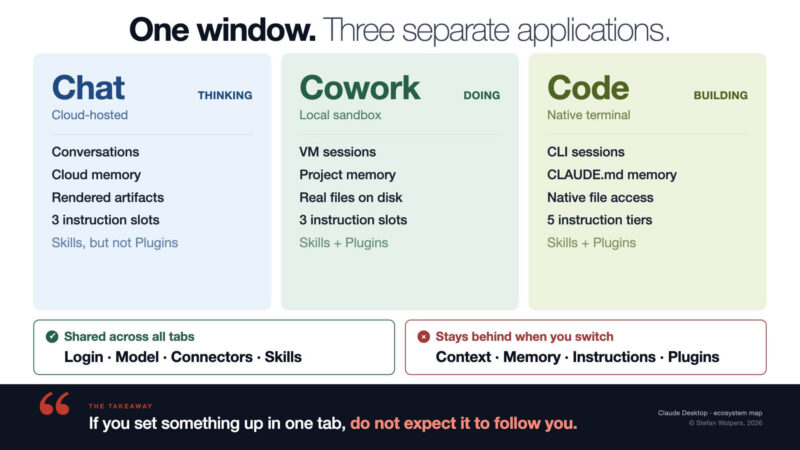
TL;DR: Understand the Claude Desktop Architecture and Save Time
You configured Claude in Claude Desktop, wrote instructions, uploaded reference files, and set your preferences. Then you clicked the Cowork tab.
Unfortunately, Claude had no memory of what you just did. Your instructions were gone, as were your files and preferences. You assumed this was a bug, but it is a feature: You switched applications.
🎓 🇬🇧 The Claude Cowork Online Course — Available June 8-15 for $129
You have been prompting AI for months. The results are inconsistent, every conversation starts from zero, and the model forgets who you are. That is the ceiling of prompting.
The Claude Cowork Online Course teaches you to break through it: build Skills that encode your expertise, connect them to your tools, and assemble Agents who handle recurring work the way you would handle it yourself. No coding required.
What You Will Get:
✅ 8+ hours of self-paced video modules: Skills, Agents, delegation frameworks — ✅ Tested with a live BootCamp cohort (April 2026) — ✅ The A3 Framework: decide what to delegate and what to keep — ✅ Starter kit with folder structure, CLAUDE.md, and Skill templates — ✅ All texts, slides, prompts, graphics; you name it — ✅ Designed for the $20/month Pro plan — ✅ Lifetime access to the version you purchase — ✅ Claude Cowork Foundational Certificate.

👉 Please note: The course will be available for $129 from June 8 to 15, 2026! (After that, $199.) 👈
🎓 Join the Waitlist of the Course Now: Claude Cowork: Stop Prompting. Start Delegating. No Coding Required!
🇩🇪 Zur deutschsprachigen Version des Artikels: Arbeiten mit Cowork: Die Claude Desktop Applikation ist 3 verschiedene Apps.
🗞 Shall I notify you about articles like this one? Awesome! You can sign up here for the ‘Food for Agile Thought’ newsletter and join 35,000-plus subscribers.
🎓 Join Stefan in one of his upcoming Professional Scrum training classes!
The Claude Desktop App Hosts 3 Separate Applications
The tabs at the top of Claude Desktop (Chat, Cowork, Code) appear to be views of the same product. They are not. For example, Anthropic’s own documentation describes Cowork as using “the same agentic architecture that powers Claude Code”. However, in practice, each tab runs on a different execution layer with its own sandbox, memory system, and instruction hierarchy.
The architectural split matters: Cowork and Code share an engine. Chat is a separate system entirely. A useful functional shorthand is as follows:
- Chat is for thinking: It runs in the cloud on Anthropic’s servers. It cannot access files on your machine; you have to provide those. In Chat, you converse, you reason, you get answers.
- Cowork is for doing: It runs inside a sandboxed Linux virtual machine, or VM in short, on your local computer. It reads and writes files in folders you mount, works autonomously in the background, and wipes the VM after every session. (Which is also, as you may imagine, the reason that Cowork does not remember previous sessions: The previously used VM is gone.)
- Code is for building: It runs natively in your terminal with full system access and no sandbox. It is made for engineers.
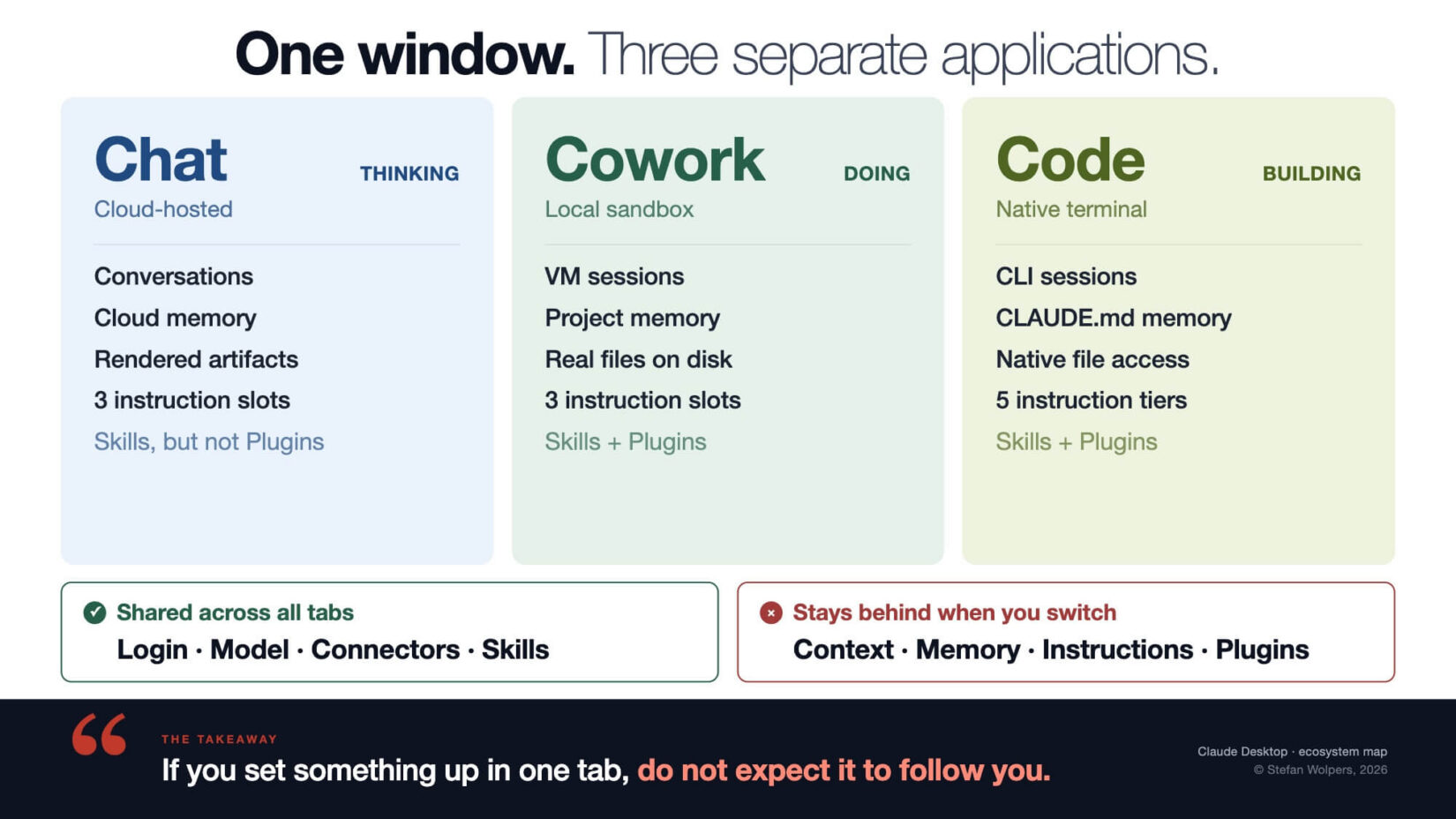
So, there is an architectural reason why the instructions you just spent 20 minutes writing do not follow you when you move between tabs.
Let’s see what crosses the tab boundary and what does not:
The Word “Project” Means 3 Different Things
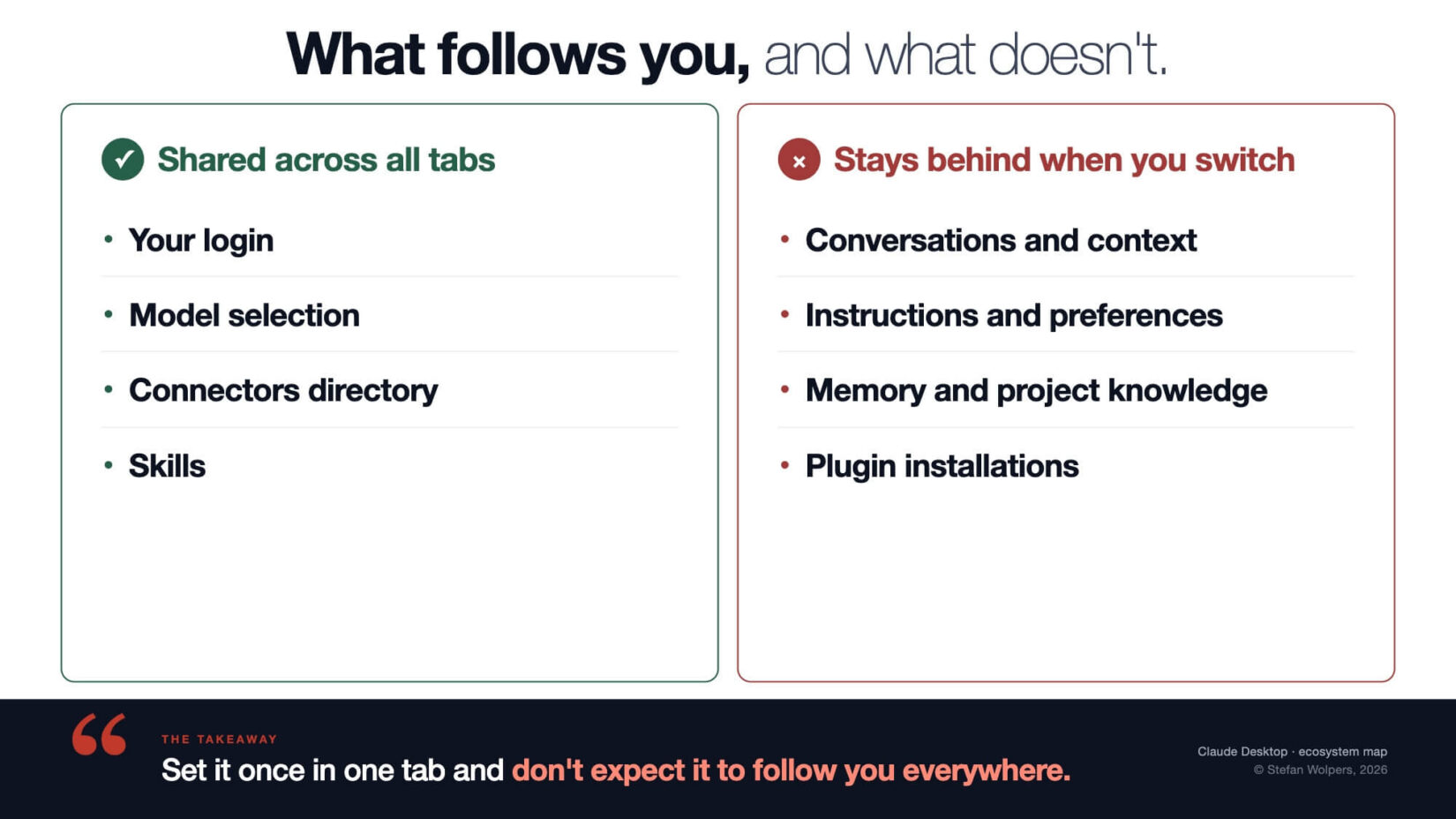
This is the collision that wastes the most time. Which of these three did you configure last week?
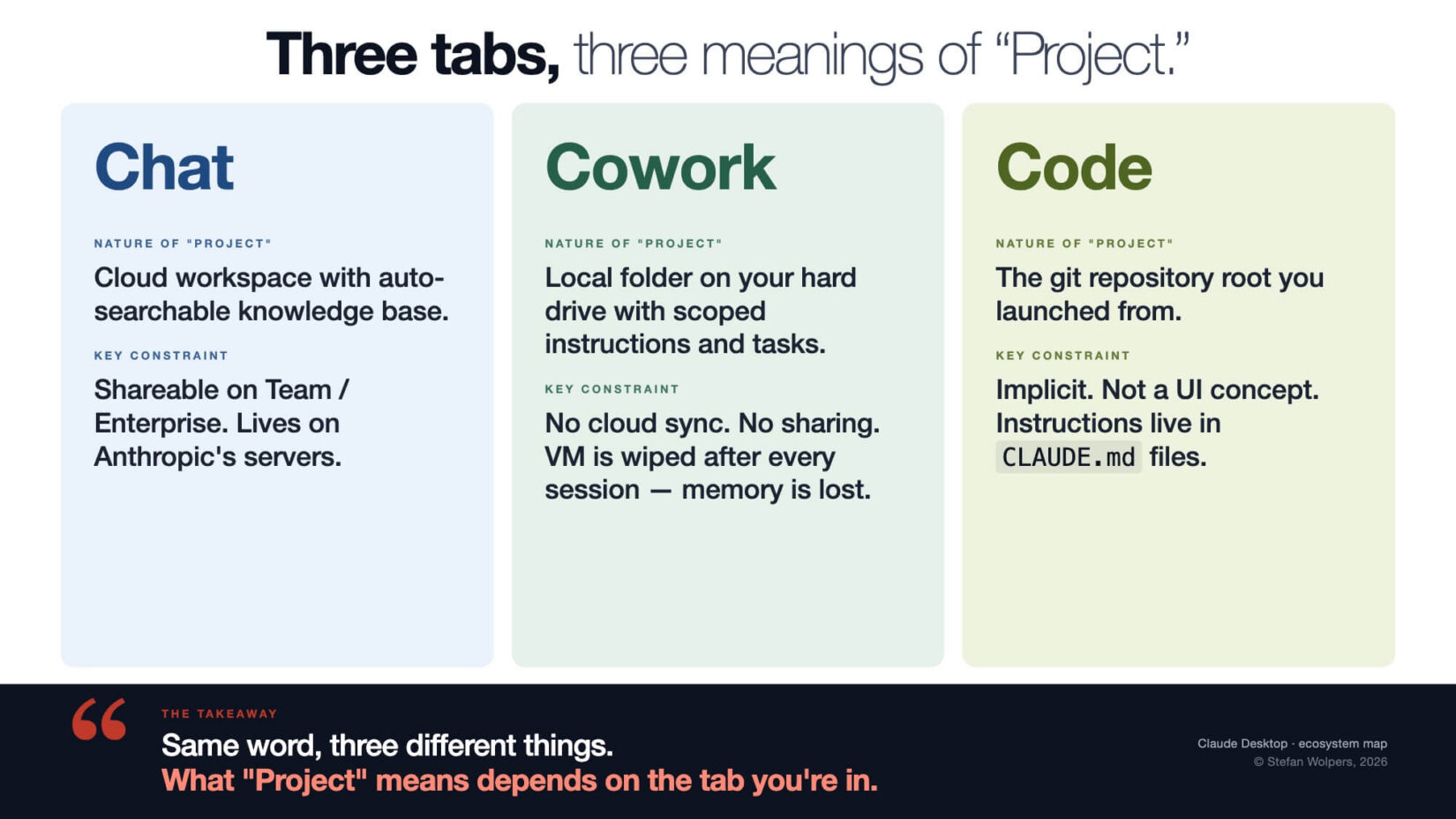
The Cowork Projects documentation confirms that Cowork projects live locally on your desktop, separate from Chat Projects. Your Chat Project knowledge base is invisible to Cowork and Code.
When Cowork says “choose a project,” it offers three options: start from scratch (a new folder), import from a Chat Project (a one-way snapshot, not a live link, not future synchronization between the two either), or use an existing folder on your hard drive. The word “Project” appears three times on that screen, referring to different things.
Cannot see the form? Please click here.
Memory, Artifacts, and Instructions Collide, too
Given the current architectural state of three different Claude apps, posing as one, this pattern repeats across every shared term.
- Memory: Chat auto-summarizes your conversations in the cloud. Cowork has project-scoped memory only (Note: that refers to “projects” listed in the sidebar.) Standalone Cowork sessions without a project remember nothing, because the VM that ran the session is wiped when it ends. Code uses
CLAUDE.mdfiles, plus an auto-memory system. - Artifacts: In Chat, an artifact is a rendered preview in a side panel (HTML, React, SVG). In Cowork, the same word means a real file on your disk (.docx, .xlsx, .pdf) or a Live Artifact (a persistent interactive dashboard that survives session restarts).
- Instructions: Chat has two instruction locations (Profile Preferences and Project Instructions) plus a Styles selector for writing tone. Cowork has three different locations (Global, Folder, Project). Code has a five-tier hierarchy: managed policies, CLI flags,
.claude/settings.local.json,.claude/settings.json, and~/.claude/settings.json, plusCLAUDE.mdfiles at user, project, and local levels. None of the instructions syncs across tabs.
Count the instruction locations you have configured. Now count the ones you assumed were active in a different tab. That is the gap.
Watch Out When Working with Claude Desktop: Back Up Your Folder Before Your First Cowork Session
Cowork’s sandbox prevents access to files outside your mounted folder. Inside that folder, Cowork has full read and write access. It does not archive. It does not move files to a trash folder. When it deletes, the files are gone.
On the day Cowork launched in January 2026, a user recorded their first session on video. They asked Cowork to “clean up” a folder. Cowork ran an rm -rf command inside the autonomous Linux VM and permanently deleted 11 GB of files. The video went viral on Hacker News. Anthropic has since added a deletion confirmation prompt that requires explicit permission before Cowork permanently deletes any files. The underlying access model has not changed: inside your mounted folder, Cowork can do anything.
As of May 2026, these actions leave no audit trail. Anthropic states this directly: “Do not use Cowork for regulated workloads”. If you work in a regulated industry, that sentence applies to you. If it is gone, it is gone.
Back up every folder you mount to Cowork, that’s non-negotiable.
Obviously, Anthropic Knows About the Tab Isolation
Dispatch, available as a research preview for Pro and Max plans, lets you send tasks from your phone to a Cowork session running on your desktop. It is a mobile-to-desktop bridge. The isolation between Chat, Cowork, and Code remains. Dispatch signals where the product is heading.
2 Documents So You Do Not Have to Discover This The Hard Way
I put together three companion documents for the introductory module of my upcoming Claude Cowork Online Course. They cover the architecture, the terminology collisions, and the practical setup steps. I am sharing two of them here because the confusion they address is real and widespread, and nobody should have to discover these things by losing work:
- The Quick Reference Card maps Chat, Cowork, and Code across nine dimensions: environment, file access, sandbox, execution model, project type, memory, output type, extensions, and instruction locations. Pin it to your wall or keep it open during your first week with Cowork: Working with Cowork: Quick Reference Card.
- The Terminology Collision Glossary maps eight terms (Project, Memory, Artifacts, Instructions, Workspace, Session, Tool, Agent) across four surfaces (Chat, Cowork, Code, API). The “Project” row alone will save you thirty minutes of confusion: Working with Cowork: Terminology Glossary.
Conclusion: Before You Start with Claude Desktop and Cowork, Take 4 Steps in 5 Minutes
If you are about to use Cowork for the first time, do these four things:
- Create a dedicated folder for Cowork. Not your Documents folder. Not your Desktop. A purpose-built folder with a clear name within your existing local file system.
- Set up backups for that folder before you mount it. Time Machine on macOS. File History on Windows. Git if you prefer. Do this before you give Cowork access.
- Open Cowork, create a project by choosing Project from the sidebar and clicking “New Project”, and point it at that folder. Write one sentence of instructions describing what you use this workspace for. (You can iterate on the instructions later.)
- Switch between all three tabs. Verify for yourself that your Project, your instructions, and your memory do not follow you.
Invest five minutes of your time, and these four steps prevent the mistakes that cost people hours.
Once you stop fighting Claude Desktop’s architecture and start working with it, Cowork becomes a different tool entirely. That is what the rest of the course is about.
Claude Desktop: Related Articles
No More Cheap Claude: Four First Principles of Token Economics in 2026
Stop Telling Professionals How to Do Their Job — Commander’s Intent at Work
Three AI Skills to Sharpen Judgment
👆 Stefan Wolpers: The Scrum Anti-Patterns Guide (Amazon advertisement.)
📅 Training Classes, Workshops, and Events
Learn more about Token Economics with our AI and Scrum training classes, workshops, and events. You can secure your seat directly by following the corresponding link in the table below:
| Date | Class and Language | City | Price |
|---|---|---|---|
| 🖥 💯 🇬🇧 July 20,2026 | GUARANTEED: AI 4 Agile Course v3 — Master AI for Agile Practitioners (English; Self-paced Online Course) | Self-paced Online Course | $149 incl. 19% VAT (If applicable.) (Before and after: $249) |
| 🖥 💯 🇬🇧 July 23,2026 | GUARANTEED: HoA 76: Where Are Your Decisions to Avoid AI Debt? (English) | Meetup | FREE |
| 🖥 🇩🇪 August 25-26, 2026 | Professional Scrum Product Owner Training (PSPO I; German; Live Virtual Class) | Live Virtual Class | €999 incl. 19% VAT (If applicable.) |
| 🖥 💯 🇬🇧 August 27 to September 17,2026 | GUARANTEED: AI4Agile BootCamp #8 (English; Live Virtual Cohort) | Live Virtual Cohort | €499 incl. 19% VAT (If applicable.) |
| 🖥 💯 🇬🇧 Sep 28-29,2026 | GUARANTEED: A3 Delegation System Founding Workshop (English; Live Virtual Class) | Live Virtual Class | $199 incl. 19% VAT (If applicable.) |
| 🖥 🇩🇪 Sep 30 to Oct 1, 2026 | Professional Scrum Product Owner Training (PSPO I; German; Live Virtual Class) | Live Virtual Class | €999 incl. 19% VAT (If applicable.) |
See all upcoming classes here.

You can book your seat for the training directly by following the corresponding links to the ticket shop. If your organization’s procurement process requires a different purchasing approach, please contact Berlin Product People GmbH directly.
